Meta ads analytics for creative: hook rate, hold rate and ROAS
Meta Ads Analytics is AdGraam’s analytics for Facebook and Instagram ads. Connect your Meta ad account and it shows ROAS, CPA, CTR and spend, hook and hold rates for every video, audience splits, creative fatigue and anomaly alerts, with an AI analyst that answers from your own data. It reads your account and never publishes, edits or pauses your ads.
No credit card needed. Sign up with a work email to get free credits.
What Meta Ads Analytics shows
It turns your Facebook and Instagram numbers into creative decisions: which ads to give more budget, which ones are tiring, and what to make next.
Performance dashboards
Spend, revenue, purchases, ROAS, CPA, CPM, link CTR, CPC, conversion rate, AOV and frequency across campaigns, ad sets and ads, for 7, 14, 30 or 90 days or a custom range.
Hook and hold for every video
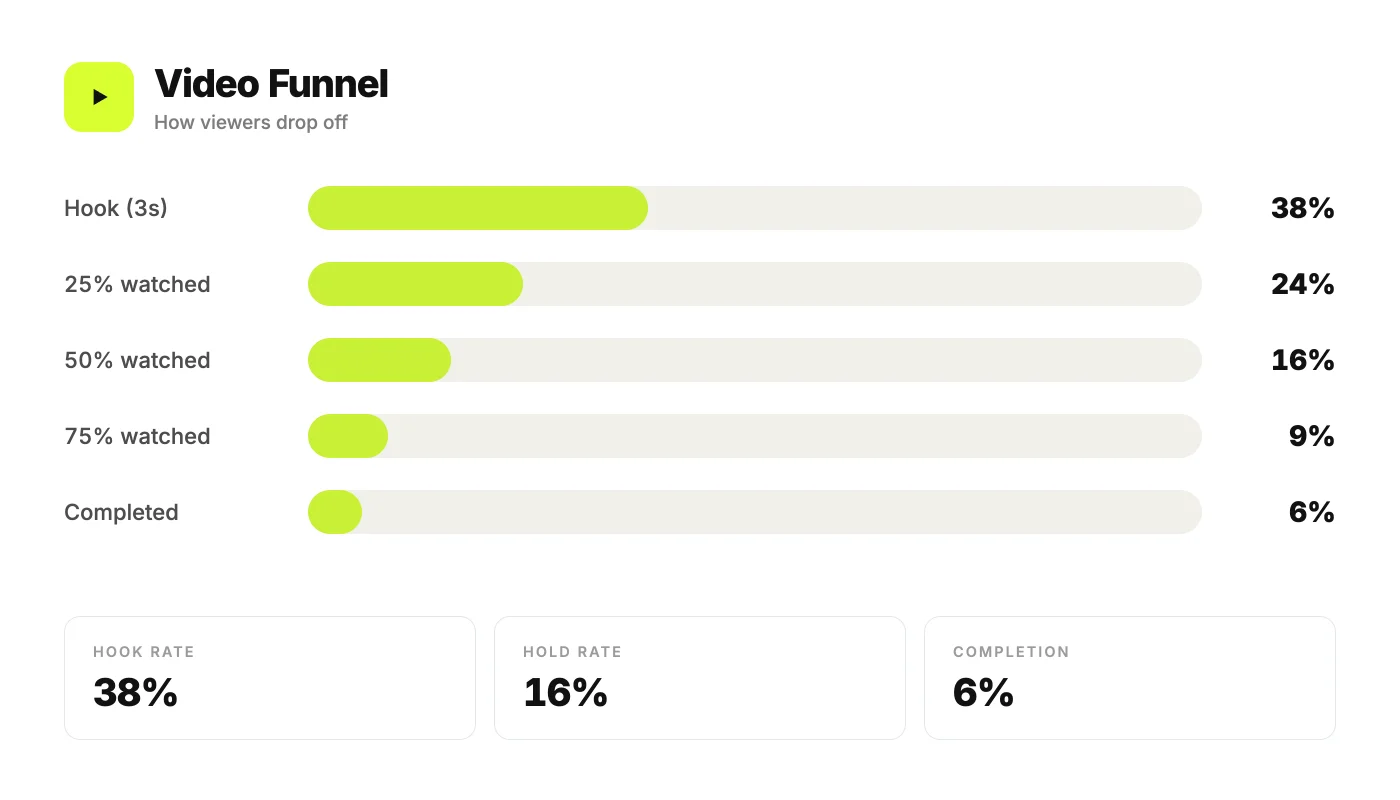
Hook rate, hold rate and completion for each video ad, plus how many viewers reach 25, 50, 75 and 100% of it.
Audience splits
Results by age and gender, by country and by placement, so you can see who your ads actually reach and who buys.
Winners and fatigue flags
Ads are flagged Winner, Scale, Fatiguing or Kill? using your target CPA or ROAS and a creative fatigue score from 0 to 100.
Anomaly alerts
Sudden swings in CTR, CPC, ROAS, spend or frequency, conversion drops and creative fatigue show up as alerts inside AdGraam.
An AI analyst for your account
Ask questions in plain English. The AI chat answers from your own data, such as top performers, trends, spend pacing and your funnel.
How to analyse your Meta ads in AdGraam
Connect Meta
Sign in with Facebook and choose the ad accounts to connect. AdGraam syncs your campaign, ad set and ad data.
Set your goals
Add a target CPA or ROAS. Without one, ads are judged against your 30-day account average.
Read the dashboard
See the headline numbers for your chosen date range, compared with the previous period, and the Needs attention list of what to act on.
Dig into creative
Open any ad to see its hook rate, hold rate, watch depth and fatigue score, and compare it with the rest of your account.
Make the next ad
Take what the data says into Copy Ads, the Video Agent or the Creative Generator and brief your next round of creative.
Who Meta Ads Analytics is for
Media buyers
Spot the ads worth more budget and the ones losing money without exporting reports from Ads Manager.
Creative strategists
See which hooks stop the scroll and where viewers drop off, so the next brief is based on what worked.
Founders and agencies
Connect several ad accounts, switch between them or select a few at once, and ask the AI analyst for a plain-English answer.
What Meta Ads Analytics costs
You can sign up free with no credit card, and accounts created with a work email get free credits to try it. After that you pay with AdGraam credits for what you generate.
Connecting an ad account and the daily AI analysis of it use a small number of credits, which appear in your usage history. If your balance runs low, the AI analysis pauses while your data keeps syncing, and it picks up again after you top up.
Credits are bought in one-time plans with no subscription, they never expire, and one balance covers every AdGraam product.
See AdGraam pricing for credit plans.
Frequently asked
What are hook rate and hold rate?
Hook rate is the share of video impressions that become 3-second plays, so it shows whether the opening stops the scroll. Hold rate is ThruPlays divided by 3-second plays, so it shows whether people keep watching after the hook. AdGraam shows both for every video ad.
Can AdGraam change or pause my Meta ads?
No. AdGraam reads your Meta data to build its reports. It never publishes, edits or pauses an ad and never changes a budget. You keep making those changes in Meta Ads Manager.
Which metrics does it track?
Spend, revenue, purchases, ROAS, CPA, CPM, link CTR, CPC, conversion rate, AOV, impressions, reach and frequency, plus hook rate, hold rate and 25, 50, 75 and 100% watch depth for video ads.
How does AdGraam spot creative fatigue?
Each ad gets a fatigue score from 0 to 100 based on frequency, a falling CTR, a rising CPM and ROAS. Ads above 60 are flagged as Fatiguing, and sudden swings in CTR, CPC, ROAS, spend or frequency appear as anomaly alerts.
Can I connect more than one ad account?
Yes. Connect your Meta ad accounts once, then switch between them or select several at once in the account picker.
What are the benchmarks compared against?
Your own account. AdGraam ranks each ad against the rest of your ads, and judges results against the target CPA or ROAS you set, or your 30-day average if you have not set one.
Related pages
Other AdGraam features
Your move
See what is really winning in your account
No credit card needed. Sign up with a work email to get free credits.